Built for the field.
Runs on the phone in your crew's pocket.
Checklists, photos, and status updates work from any phone browser — no app install, no tablet in the truck. Templaters and installers check things off right at the job site, and the office sees it live.
No App Required
Runs in any phone browser — crews never install anything.
Photo Capture
Snap site conditions and final install photos on the spot.
Live Progress
The office sees checklist progress as it happens.
Required Steps
Crews can't mark a phase complete until must-dos are done.
Never re-measure because the sink changed.
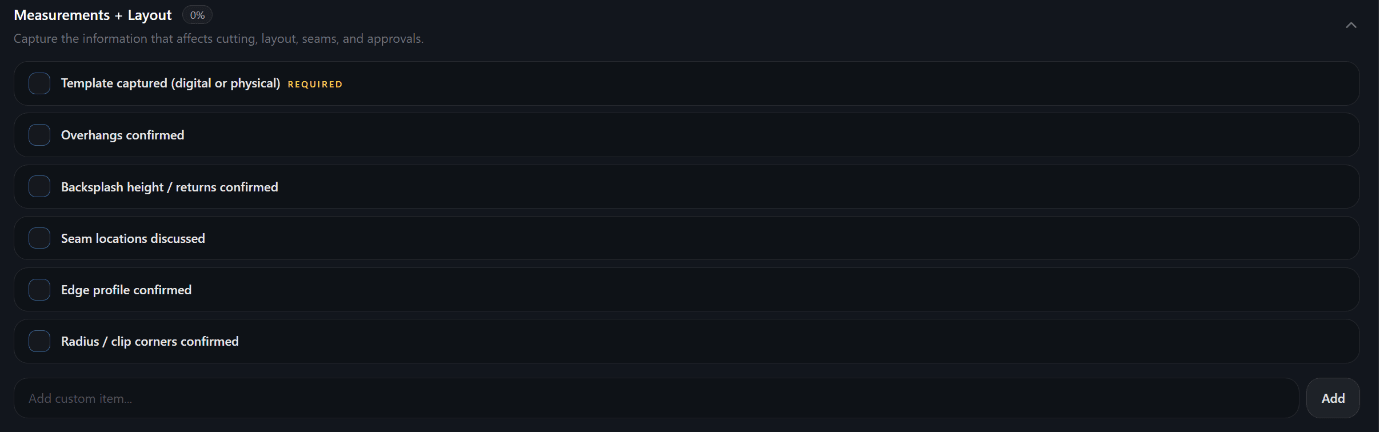
A guided checklist takes templaters through job confirmation, sink and fixture details, measurements, and a site risk check — with required steps enforced so nothing gets fabricated on incomplete information.
Guided Sections
Job confirmation, fixtures, measurements & layout, and site risk — in order.
Required Steps
Mark critical items as required so they can't be skipped before fabrication.
Custom Items
Add your own checklist items to match how your shop templates.
Works on Mobile
Templaters complete it from their phone right at the job site.
Everything loaded before you leave the shop.
Crews run a loadout and arrival checklist, then work the install sequence and closeout — dry fit, seams, sink, splash, final photos, and customer sign-off. Nothing left to memory, nothing left behind.
Loadout
Pieces, seam setters, adhesives, tools — verified before leaving.
Site Readiness
Carry path, cabinet prep, power, and protection confirmed on arrival.
Install Sequence
Dry fit → level → seams → sink → splash → clean and polish.
Closeout
Final photos, walkthrough, sign-off, and care instructions.
See the job site before the install truck does.
Templaters tag risks like stairs, tight turns, and long carries and attach photos right from the site. The shop reviews them before fabrication — instead of discovering problems at install.
Field Photos
Attach site condition photos to the job from a phone browser.
Risk Tags
Flag stairs, narrow access, long carries, parking, and more.
Crew Review
Installers review the photos and risks before arriving.
Catch Early
Resolve access and site issues in planning, not on install day.
Job planning questions.
How do template checklists prevent mistakes?+
What's in the install checklist?+
Can crews use this on their phone in the field?+
Can I customize the checklists?+
How do site condition photos help?+
Stop discovering field problems in the shop.
Give your templating and install crews checklists that catch issues before they cost you.